Application
We cooperate with local developers to provide industrial solutions for customers.



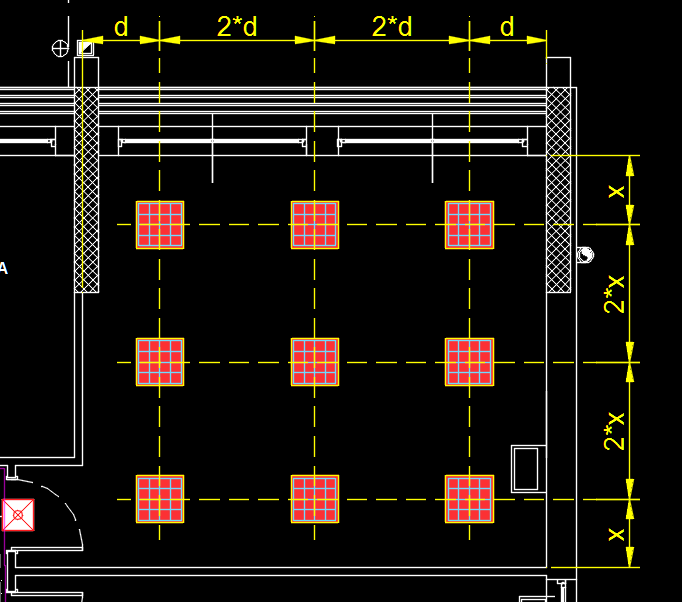
Light Distribution distributes luminaires or other ceiling-mounted fixtures inside a room according to the rule that: the distance between elements is twice the distance between the elements and the room walls.
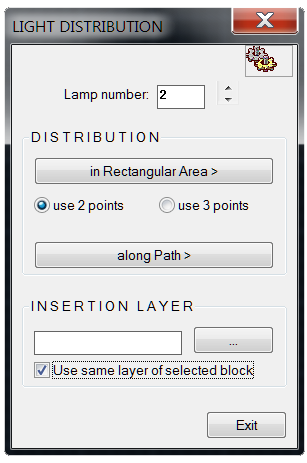
The program requires only 3 inputs:
• The number of lamps or elements to arrange
• The definition of the room's perimeter (by specifying 2 or 3 vertices)
• The block name to insert to represent the lamp or element
The program automatically arranges the elements according to an optimal layout
By pressing the TAB key, you can change the distribution layout until you find the one that best suits your room type.
An additional tool to perfect the arrangement of the fixtures is the ability to rotate them cyclically around their insertion point by pressing the R key.
Layout changes and rotations happen interactively, allowing the designer to quickly review all possible layouts applicable to that room with that number of elements.